

The Extensive Use of Photo Editing Software
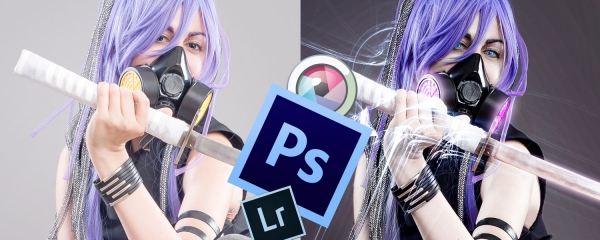
As the illustration above shows, when editing cosplay photos my weapon of choice is mostly Adobe Photoshop, while for subtler effects I play in Autodesk Pixlr, or Adobe Lightroom. The debate about the uses of photo editing software in photos that should represent your work as it is goes on. As there are people who don't hesitate to even transplant stock face parts to their own in order to look perfect, there are also elitists (even though this group is dramatically smaller), who think that photos should be edited very little to nothing.
Personally, I use a lot of photoshop. And I edit very little on my cosplay itself. What I use editing for, is to bring my characters into their natural habitat, their games' surrounding, their anime background, their manga setting, primarily because I shoot most of my cosplays on a grey screen, in a studio. To add some matching light to make the photo more natural, to brush up skin a bit. But that is all. I neither chase poreless porcelain skin nor I liquify any of my cosplays into unnatural broken figures. I pretty much look like that thing in the photos. And so do my friends I edit photos for. Actually, I would never kill the makeup artistry done on a face because that would be plain stupid and disrespective to the ones who did the makeup. I like the pretty skin texture which remains when I'm through with post-processing.
We've had some funny cases of people screaming how I edited the photos too much, and others adding them to "cg" or "figures" albums and collections. I've had a lot of laughs indeed. I've been playing with photos for eight years now, and I'm self taught. I'm not sorry for my Photoshop.
To add a comment to the blog, you have to first join the site or login as a user


Categories
Most Popular
-
For The Sake of Revolutionizing The World
March 21, 2016
-
That Purple Samurai
January 21, 2016
-
Archive
-

By the Power of Althemy


